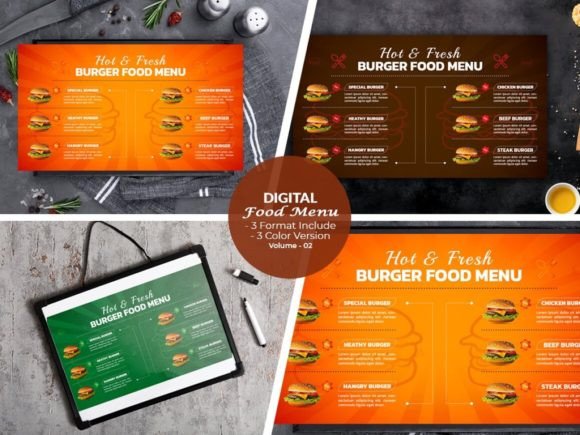
Digital Menu Board Templates: Elevate Your Food Business
Visual Appeal That Drives Sales
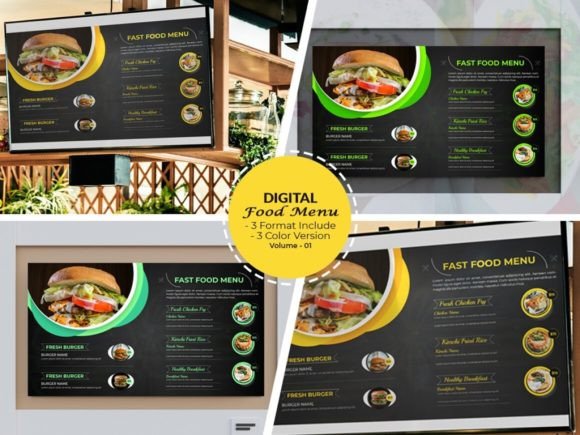
When you walk into a modern café or fast-casual restaurant, the first thing that catches your eye is often the digital menu board. It’s not just a list of items—it’s a visual experience that sets the tone for your entire visit. Our Digital Menu Board Templates are crafted to deliver exactly that: a polished, professional look that feels both inviting and easy to navigate. The design balances clean typography with strategic layout, ensuring customers can quickly find what they want while being drawn to your featured items. The templates include two fully customizable versions, each in a landscape orientation optimized for standard displays. The color schemes are neutral yet modern, allowing you to adapt them to any brand palette without clashing. Whether you run a juice bar, a pizzeria, or a bakery, these templates provide a foundation that feels contemporary but timeless.
Customization Without the Headache
One of the biggest challenges with design templates is flexibility. You want something that looks great out of the box but also lets you make it your own. That’s where these Digital Menu Board Templates shine. The files come in AI, EPS, and PDF formats, all fully editable in Adobe Illustrator CC or later versions. This means you can adjust colors, swap fonts, rearrange sections, and even add your own photography with minimal effort. The templates use Google Fonts, with download links included, so you don’t have to worry about licensing issues for your typography. The resolution is 300 DPI at 1920x1080 pixels, ensuring your menu looks sharp on any screen, from small monitors to large televisions. The inclusion of three color versions gives you a head start on different themes—perhaps one for daily specials, another for seasonal promotions, and a third for your core menu. The design is intuitive, with clear layers and labeled groups, so even if you’re not a seasoned designer, you can navigate the files without frustration.
Practical Applications Across Industries
While these templates are built for food service, their utility extends beyond restaurants. Imagine a retail store using them for promotional displays, a gym showcasing class schedules and healthy snack options, or a corporate office using them in break rooms for employee menus. The digital menu board format is versatile enough for any environment where information needs to be communicated clearly and attractively. For small business owners, this is a cost-effective way to maintain a consistent brand presence without hiring a designer for every update. Marketers can use them for A/B testing different layouts or messaging, while content creators might adapt them for video backgrounds or social media graphics. The templates’ clean aesthetic also makes them suitable for upscale venues—think wine bars, boutique hotels, or gourmet markets—where a refined look is essential.
How Design Influences Customer Behavior
A well-designed menu does more than list items—it guides decisions. The visual hierarchy in these Digital Menu Board Templates uses font size, color contrast, and spacing to draw attention to high-margin items or daily specials. For example, bold headings and accent colors can highlight signature dishes, while subtler typography keeps the rest of the menu readable. This strategic layout can increase average order value and reduce customer hesitation. Consistency is another key factor. When your digital menu matches your website, social media, and print materials, it reinforces brand recognition and professionalism. Customers perceive a cohesive visual identity as a sign of reliability, which can build trust and loyalty over time. The templates’ modern typography—clean sans-serif fonts with optional script accents—strikes a balance between approachability and sophistication, making them suitable for both casual eateries and fine dining.
Tips for Effective Implementation
Start by evaluating your brand’s color palette and choose one of the three included color versions that aligns closest. From there, customize the accent colors to match your logo or interior design. Pay attention to font pairings; the templates include recommendations, but you can experiment with combinations that reflect your brand’s personality—perhaps a bold sans-serif for headings and a lighter weight for descriptions. Test readability by viewing the menu from a typical customer distance. Ensure text is legible and key items stand out without overwhelming the viewer. If you’re using photography, opt for high-quality images that complement the template’s clean style. Finally, consider the context: a fast-food chain might prioritize speed and clarity, while a café could emphasize warmth and indulgence. These templates adapt to both, but your content choices will make the difference.
Why These Templates Stand Out
In a market saturated with generic designs, these Digital Menu Board Templates offer a blend of aesthetics and practicality that’s hard to find. They’re not just pretty layouts—they’re tools designed to save time, reduce design costs, and improve customer engagement. The inclusion of fully editable vector files means you can scale them without quality loss, which is crucial for large displays or future rebrands. The support for multiple Illustrator versions ensures compatibility for most designers, while the Google Fonts integration keeps your typography accessible and legal. Whether you’re launching a new restaurant, updating an existing menu, or exploring digital signage for the first time, these templates provide a solid starting point. They’re built to be customized, so your final product feels uniquely yours, not a cookie-cutter solution. In the end, a great digital menu is about communication—making it easy for customers to choose, and inviting them to come back. These templates help you achieve that with style and efficiency.